Everyday Tech Tips to Keep Your Devices Organized and Charged
Keeping phones, tablets, laptops and peripherals neat and powered is a small investment that pays daily in reduced frustration and longer device life. This guide collects practical, proven habits and simple products you can adopt right away to keep your tech organized and charged.
Below you’ll find straightforward setups for home and travel, cable and battery care tips, cleaning and storage advice, plus a quick checklist and FAQ to make adoption easy.
Designate a Dedicated Charging Station
Pick one visible, low-traffic spot in your home for nightly charging. A single surface minimizes cable clutter and prevents devices from being left on random countertops. Use a multi-port charger or a docking station so each device has a consistent spot and cable.
When choosing chargers and cables, focus on quality and compatibility. Browse trusted options under Phone Charging Accessories to find multi-port USB-C, USB-A, and fast-charging units that fit your devices and reduce the number of chargers you need.
Choose a Multi-Device Dock for Your Desk
On a work desk, a compact docking station keeps a laptop, phone and earbuds in one place and often provides cable management and angled stands to reduce wear on ports. A wireless or multi-device charger that can handle a phone plus a watch or earbuds simplifies your routine.
If you prefer a ready-made solution, consider a dedicated charging station like the GETPALS Wireless Charger iPhone Charging Station for Apple Multiple Devices to keep multiple devices charged without tangles.
Cable Management That Actually Works
Invest in a handful of cable clips, a short cable for each device type, and a small labeled basket for spare cables. The rules: one cable per device (no catch-all spaghetti), short cables for charging on desks or nightstands, and long cables only where needed.
For keyboards, mice and other desk peripherals, group items logically. A compact kit like a Wireless Keyboard and Mouse Combo reduces the number of separate cables and dongles, making surface management easier. If you want category-wide options, look at Computer Keyboards & Mice to find compact, wireless models that simplify cable needs.
Smart Power Habits to Extend Battery Life
Charge cycles matter more than topping off. For most modern lithium-ion batteries, avoid both deep discharge below 10% and constant 100% topping if you want to maximize lifespan. Regularly charging to 80–90% and unplugging is a good balance for daily use.
Enable power-saving modes on phones and laptops during long stretches away from outlets. Also, disable unnecessary wireless radios (Bluetooth, Wi‑Fi) when not in use to conserve charge and reduce the frequency of full recharges.
Keep Devices Organized in Your Car
Cars are a high-risk zone for lost or drained devices. Use a secure mount for navigation and hands-free use and a consistent pocket or organizer for cords and spare cables. A stable mount also prevents chargers and cables from slipping under seats.
For reliable in-car mounting, check options in Car Phone Mounts to find designs that fit your dash and keep charging ports accessible. Pair a mount with a storage solution like the Car Seat Side Organizer to give phones, cables and small power banks permanent pockets.
Clean and Maintain Charging Ports and Accessories
Dirty or lint-clogged ports cause intermittent charging and slow data transfer. Use compressed air or a soft, dry brush to clear ports and cable connectors regularly. For car interiors and tight spaces where dust collects, a small cleaning tool is invaluable.
To keep connectors and the interior of your vehicle tidy, consider accessories listed under Portable Car Vacuums—they’re small, handheld, and useful for removing debris around charging areas and ports.
Integrate Smart-Home Devices Intelligently
Smart devices like door locks and cameras are convenient but add battery management tasks. Group smart devices by charging frequency and check their battery status on a schedule so you can recharge or replace batteries before they die.
If you use smart entry devices that need power, browse options under Smart Doorbells & Door Locks to pick units with clear battery indicators and easy charging or wired-power options.
Store Devices Safely When Not in Use
Long-term storage needs a cool, dry place and partial charge—store batteries at about 40–60% for weeks or months. Use labeled boxes or a drawer system so chargers and cables stay with the device.
If you have a drawer-based setup, keep a simple inventory note inside: device name, charger type, and last charged percentage. That dramatically reduces time spent hunting for the right cable.
Quick Checklist
- Set one nightly charging station with multi-port charger.
- Use short, labeled cables—one cable per device.
- Adopt charging windows: 20–90% for daily care.
- Keep a wireless dock on your desk for quick top-ups.
- Use mounts and organizers for car tech and cords.
- Clean ports monthly with compressed air or a small brush.
- Store devices at ~50% charge for long-term storage.
FAQ
Q: How many charging cables should I keep?
A: Keep one primary short cable per device for daily use, one spare per device type stored with the device, and a long cable only for situations that require reach.
Q: Is a wireless charger bad for battery health?
A: Wireless charging itself isn’t harmful when used properly. Avoid leaving devices on a charger at 100% for prolonged periods; if your wireless dock keeps a device at 100% overnight, consider timing charges or using smart plugs.
Q: How often should I clean charging ports?
A: Inspect ports monthly and clean them as needed. If you carry devices in pockets or bags, check more often—lint and grit are the most common culprits of poor connections.
Q: What should I keep in my car for device emergencies?
A: Keep a compact power bank, a short charging cable for your phone, a mount for navigation, and a small organizer for spare cables. Choose sturdy, reliable accessories that fit your vehicle.
Q: Can I use the same charger for multiple devices?
A: Yes—use a multi-port charger rated for the combined power draw of connected devices. Make sure cables and ports support fast charging if you need it.
Q: How do I store rechargeable batteries long-term?
A: Store rechargeable devices with batteries at about 40–60% charge in a cool, dry place. Recharge to that range every few months to prevent deep discharge.
Conclusion
Clear habits, a few targeted products, and regular maintenance make organizing and charging devices effortless. Start by choosing a single nightly charging spot and standardizing cables—then layer in desk docks, car organizers and cleaning routines as needed. Small, repeatable systems save time and keep your tech ready when you are.
Products Featured in This Article

Car Seat Side Organizer, Auto Seat …
Product description 1 Smart Design 2 Easy Installation 3 Stronger Material The video showcases the product…

GETPALS Wireless Charger iPhone Cha…
Product description The video showcases the product in use.The video guides you through product setup.The video…
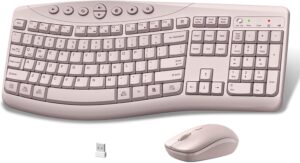
Wireless Keyboard and Mouse Combo, …
Product description 1 Full Size Keyboard 2 8 Multimedia Keys 3 Leg Frame 1 Optic Wireless…